一步两步是魔鬼的步伐

Duan1v's Blog

Laravel中使用MongoDB

扩展

查询

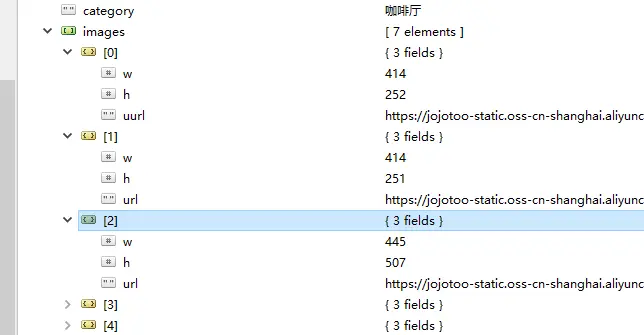
我要查所有images包含uurl的数据

https://static.duan1v.top/images/10861128-61202d548f798d73.webp
  • 原生sql
1
db.getCollection('shops').find({'images':{"$elemMatch":{'uurl':{$exists:r=true}}}})
  • 使用laravel可以写成
1
2
3
4
5
6
7
8
9
$a = Shop::query()
    ->where('images', '=', [
        '$elemMatch' => [
            'uurl' => [
                '$exists' => ['r' => true]
            ]
        ]
    ])->get();
dd($a);
  • toSql得到
1
select * from "shops" where "images" = ? and "deleted_at" is null and "meta"."status" != ?
  • 若使用下面的方式只能得到images中的子数组均含有uurl的记录
1
2
3
4
5
6
Shop::query()
    ->where('images', '<>', [])
    ->whereNotNull('images')
    ->where('images.uurl', '<>', [])
    ->whereNotNull('images.uurl')
    ->get();

Supervisor的使用

简介

  • Supervisor 是一个进程管理工具。用于管理和监控进程的客户端/服务器系统,它可用于 Linux 和 Unix 系统。Supervisor 提供了一个守护进程,可以监控指定的进程,并在进程异常退出时自动重新启动它们。

安装supervisor的时候,遇到了一些问题,比如:

  • unix:///var/run/supervisor.sock no such file
  • unix:///var/run/supervisor.sock refused connection
  • pkg_resources.VersionConflict: (supervisor 4.0.4 (/usr/local/lib/python3.7/dist-packages), Requirement.parse(‘supervisor==3.3.1’))

解决:

  • 不用apt-get直接安装,可能是源没有supervisor 4.0.4版本

环境:

1
2
3
4
5
6
7
8
9
 % lsb_release -a
No LSB modules are available.
Distributor ID: Ubuntu
Description:    Ubuntu 18.04.2 LTS
Release:        18.04
Codename:       bionic

 % python -V
Python 3.6.8

步骤,注意版本号

  • 安装python包
1
sudo python3.6 -m pip install supervisor==4.0.4
  • 从git下载supervisor,解压并cd进去
1
2
3
4
wget -O supervisor-4.0.4.zip https://github.com/Supervisor/supervisor/tree/4.0.4
unzip supervisor-4.0.4.zip 
cd supervisor-4.0.4
sudo python -m setup.py install
  • 记一下配置
 1
 2
 3
 4
 5
 6
 7
 8
 9
10
11
12
13
14
15
16
17
18
19
20
21
22
23
24
25
; supervisor config file
[unix_http_server]
file=/var/run/supervisor.sock   ; (the path to the socket file)
chmod=0700                       ; sockef file mode (default 0700)

[supervisord]
logfile=/var/log/supervisor/supervisord.log ; (main log file;default $CWD/supervisord.log)
pidfile=/var/run/supervisord.pid ; (supervisord pidfile;default supervisord.pid)
childlogdir=/var/log/supervisor            ; ('AUTO' child log dir, default $TEMP)
; the below section must remain in the config file for RPC
; (supervisorctl/web interface) to work, additional interfaces may be
; added by defining them in separate rpcinterface: sections
[rpcinterface:supervisor]
supervisor.rpcinterface_factory = supervisor.rpcinterface:make_main_rpcinterface

[supervisorctl]
serverurl=unix:///var/run/supervisor.sock ; use a unix:// URL  for a unix socket

; The [include] section can just contain the "files" setting.  This
; setting can list multiple files (separated by whitespace or
; newlines).  It can also contain wildcards.  The filenames are
; interpreted as relative to this file.  Included files *cannot*
; include files themselves.
[include]
files = /etc/supervisor/conf.d/*.conf
  • 根据配置生成日志文件夹
1
2
sudo mkdir -p /var/log/supervisor/
sudo touch /var/log/supervisor/supervisord.log
  • 好了
1
2
sudo supervisord -c /etc/supervisord.conf
sudo supervisorctl restart

配置队列

 1
 2
 3
 4
 5
 6
 7
 8
 9
10
11
12
13
14
15
16
17
18
19
20
21
22
23
24
25
26
sudo vim /etc/supervisor/conf.d/laravel-worker.conf

[program:laravel-worker]
process_name=%(program_name)s_%(process_num)02d
command=php artisan queue:work --sleep=3 --tries=3 --queue=default,high
directory=/mnt/g/Workplace/explore/php/blog/
autostart=true
startsecs=3
autorestart=true
user=kael
numprocs=8
priority=999
redirect_stderr=true
stdout_logfile=/mnt/g/Workplace/explore/php/blog/storage/supervisor.log
stderr_logfile=/mnt/g/Workplace/explore/php/blog/storage/supervisor.err.log
stdout_logfile_maxbytes=2MB
stderr_logfile_maxbytes=2MB


sudo supervisord -c /etc/supervisord.conf

sudo supervisorctl reread

sudo supervisorctl update

sudo supervisorctl start laravel-worker:*

supervisor常用命令

1
2
3
4
5
6
7
supervisorctl stop program_name	#停止某个进程
supervisorctl start program_name	#启动某个进程
supervisorctl restart program_name	#重启某个进程
sudo supervisorctl status [program_name] #查看(某个)进程
supervisorctl stop all	#停止全部进程
supervisorctl reload	#载入最新的配置文件,停止原有进程并按新的配置启动、管理所有进程
supervisorctl update	#根据最新的配置文件,启动新配置或有改动的进程,配置没有改动的进程不会受影响而重启

用户等级 非定时更新 队列优化

背景

关于用户等级,有的app会在每天某个时间点定时更新,这样可以省去处理各种触发用户升级的事件的麻烦,那如果要尽可能即时更新用户等级,可以怎么优化呢

问题

因为各种触发用户升级的事件基本都是要查数据库, 以判断用户是否达到升级要求,所以要放到队列中执行。实践中发现,存在某个时间段触发某个用户很多个升级事件的行为,造成不必要的sql查询:即用户让同事朋友为其点赞收藏评论等。

思路

可以这样优化:记录当前job的编号以及存在的最大job编号,然后执行到这个人的升级任务的时候,只执行最后一个job

实现

 1
 2
 3
 4
 5
 6
 7
 8
 9
10
11
12
13
14
15
16
17
18
19
20
21
22
23
24
25
26
27
28
29
30
31
32
33
34
35
36
37
38
39
40
41
42
43
44
45
46
47
48
49
50
51
52
53
54

class GrowthPlanLevelListener
{
    const TAG = 'GrowthPlanLevelListener: ';

    /**
     * @param HasOwner|Event $event
     */
    public function handle($event)
    {
        /** @var User $user */
        $user = $event->getOwner();
        // phpcs:ignore
        // 此处获取版本信息,需要可序列化,所以不可以把这个listener实现Illuminate\Contracts\Queue\ShouldQueue
        // 解决方式是先获取$withJpush,再生成一个实现ShouldQueue的job,并把$withJpush传进去
        $withJpush = !LevelManager::isIncompatibleAgent();
        info(sprintf(
            '%s user %d check and upgrade growth plan level.',
            self::TAG,
            $user->id
        ));
        dispatch(new GrowthPlanLevelJob(
            $user,
            $withJpush,
            $this->getNum(sprintf(GROWTH_PLAN_JOB_KEY, $user->id))
        ));
    }

    private function getNum($key)
    {
        return Redis::connection()->eval(
            $this->preventRepeated(),
            1,
            $key
        );
    }

    // 不能让前一个job刚set完,后一个job没读到又set一次
    private function preventRepeated()
    {
        return <<<'LUA'
            local hash = redis.call('get', KEYS[1])
            local num = 1
            
            if hash then
                num = redis.call('incr',KEYS[1])
            else
                redis.call('set',KEYS[1],1)
            end
            
            return num
LUA;
    }
}
 1
 2
 3
 4
 5
 6
 7
 8
 9
10
11
12
13
14
15
16
17
18
19
20
21
22
23
24
25
26
27
28
29
30
31
32
33
34
35
36
37
38
39
40
41
42
43
44
45
46
47
48
49
50
51
52
53
54
55
56
57
58
59
60
class GrowthPlanLevelJob extends Job implements ShouldQueue
{
    const TAG = 'GrowthPlanLevelJob';

    /**
     * @var User $user
     */
    private $user;

    private $withJpush;

    /**
     * 由于存在某个时间段触发某个用户很多个升级事件的行为,造成不必要的sql查询
     * 所以需要记录当前job的编号以及存在的最大job编号,然后执行到这个人的升级任务的时候,只执行最后一个job
     * @var int $jobNum
     */
    private $jobNum;

    public $tries = 3;
    
    public $timeout = 180;

    public function __construct($user, $withJpush, $jobNum = 1)
    {
        $this->user = $user;
        $this->withJpush = $withJpush;
        $this->jobNum = $jobNum;
    }

    /**
     * @throws \Illuminate\Contracts\Redis\LimiterTimeoutException
     */
    public function handle()
    {
        $jobKey = sprintf(GROWTH_PLAN_JOB_KEY, $this->user->id);
        $count = Redis::connection()->get($jobKey);
        $info = [
            'user_id' => $this->user->id,
            'count'   => $count,
            'job_num' => $this->jobNum
        ];
        if (!$count) {
            info(self::TAG . ' $count is invalid.', $info);
            return;
        }
        if ($count > $this->jobNum) {
            info(self::TAG . ' remain other job of upgrade this user growth plan.', $info);
            return;
        }
        info(self::TAG . ' start executing job.', $info);
        Redis::connection()
            ->funnel($funnelKey = self::TAG . $this->user->id)
            ->limit($limit = 1)
            ->then(function () use ($funnelKey, $limit) {
                $levelManager = new LevelManager($this->user);
                $levelManager->checkAndUpLevel($this->withJpush);
            });
        Redis::connection()->del($jobKey);
    }
}

php解决并发操作影响:LuaScripts

背景

问题
异步操作同一个代码块时,比如多个队列,恰巧有两个一起被触发,会在mysql读取到脏数据,虽然可以使用lockForUpdate避免,但是若有很多并发队列,会造成这条记录一直处于被锁的状态,以至于其他地方无法正常获取数据。因为如果get()和set的操作不是原子性的,会造成很小概率的,第二条队列在第一条set()之前get()了,导致无法锁上,所以采用以下方式加锁。

使用lua脚本避免

 1
 2
 3
 4
 5
 6
 7
 8
 9
10
11
12
13
14
15
16
17
18
19
20
21
22
23
24
25
26
27
private function getLock($key)
{
    return $this->redis->eval(
        $this->preventRepeated(),
        1,
        $key
    );
}

private function preventRepeated()
{
    return <<<'LUA'
        local hash = redis.call('get', KEYS[1])
        
        if hash then
            return 0
        else
            redis.call('set',KEYS[1],1)
            return 1
        end
LUA;
}

private function releaseLock($keys)
{
    $this->redis->del($keys);
}

laravel中使用的 频率限制 的封装的 funnel 方法 ,是一个道理,是用循环获取锁进行sleep操作

相关文档

WSL搭建nginx+php+mysql环境

安装:

  • 管理员权限运行powershell并运行下面的命令:
1
Enable-WindowsOptionalFeature -Online -FeatureName Microsoft-Windows-Subsystem-Linux
  • Microsoft Store下载Linux,我用的是Ubuntu,安装完成后可在开始菜单里找到快捷方式并启动,第一次运行需要等待安装并设置用户名、密码。

初始化

  • 更换源:

查看Ubuntu版本:

1
lsb_release -a

找apt源(阿里,163等):

 1
 2
 3
 4
 5
 6
 7
 8
 9
10
11
#阿里云源
deb http://mirrors.aliyun.com/ubuntu/ bionic main restricted universe multiverse
deb http://mirrors.aliyun.com/ubuntu/ bionic-security main restricted universe multiverse
deb http://mirrors.aliyun.com/ubuntu/ bionic-updates main restricted universe multiverse
deb http://mirrors.aliyun.com/ubuntu/ bionic-proposed main restricted universe multiverse
deb http://mirrors.aliyun.com/ubuntu/ bionic-backports main restricted universe multiverse
deb-src http://mirrors.aliyun.com/ubuntu/ bionic main restricted universe multiverse
deb-src http://mirrors.aliyun.com/ubuntu/ bionic-security main restricted universe multiverse
deb-src http://mirrors.aliyun.com/ubuntu/ bionic-updates main restricted universe multiverse
deb-src http://mirrors.aliyun.com/ubuntu/ bionic-proposed main restricted universe multiverse
deb-src http://mirrors.aliyun.com/ubuntu/ bionic-backports main restricted universe multiverse

切到Ubuntu

1
2
3
4
cd /etc/apt
sudo su root
cp sources.list sources.list.bak
vim sources.list # ggVG,dd,ESC,i,鼠标右键,Esc,:x,Enter
1
2
3
4
5
sudo apt-get update
sudo apt install git nginx mysql-server redis-server
sudo add-apt-repository -y ppa:ondrej/php
sudo apt-get update -y
sudo apt install php7.1 php7.1-fpm php7.1-mbstring php7.1-xml php7.1-json php7.1-mysql php7.1-curl php7.1-zip php7.1-dev php7.1-gd php7.1-bcmath
  • tips : 如果sudo apt-get update时出现以下错误
1
2
3
4
5
6
7
8
9
Get:6 http://mirrors.aliyun.com/ubuntu bionic-updates InRelease [88.7 kB]
Err:3 http://mirrors.aliyun.com/ubuntu bionic InRelease
  The following signatures couldn't be verified because the public key is not available: NO_PUBKEY 3B4FE6ACC0B21F32
Get:7 http://mirrors.aliyun.com/ubuntu bionic-proposed InRelease [242 kB]
Get:8 http://mirrors.aliyun.com/ubuntu bionic-backports InRelease [74.6 kB]
Err:4 http://mirrors.aliyun.com/ubuntu bionic-security InRelease
  The following signatures couldn't be verified because the public key is not available: NO_PUBKEY 3B4FE6ACC0B21F32
Err:6 http://mirrors.aliyun.com/ubuntu bionic-updates InRelease
  The following signatures couldn't be verified because the public key is not available: NO_PUBKEY 3B4FE6ACC0B21F32

则执行 (改下key)

1
sudo apt-key adv --keyserver keyserver.ubuntu.com --recv-keys 3B4FE6ACC0B21F32
 1
 2
 3
 4
 5
 6
 7
 8
 9
10
11
12
13
14
15
16
17
18
19
20
21
22
# 安装composer
kael@PC-201902071414:~$ mkdir /mnt/d/Ubuntu
kael@PC-201902071414:~$ cd /mnt/d/Ubuntu/
kael@PC-201902071414:/mnt/d/Ubuntu$ wget https://getcomposer.org/composer.phar
--2019-02-10 13:30:47--  https://getcomposer.org/composer.phar
Resolving getcomposer.org (getcomposer.org)... 54.36.53.46, 2001:41d0:302:1100::8:104f
Connecting to getcomposer.org (getcomposer.org)|54.36.53.46|:443... connected.
HTTP request sent, awaiting response... 200 OK
Length: 1912030 (1.8M) [application/octet-stream]
Saving to: ‘composer.phar’

composer.phar                 100%[=================================================>]   1.82M  29.7KB/s    in 76s

2019-02-10 13:32:08 (24.5 KB/s) - ‘composer.phar’ saved [1912030/1912030]

kael@PC-201902071414:/mnt/d/Ubuntu$ mv composer.phar composer
kael@PC-201902071414:/mnt/d/Ubuntu$ chmod +x composer
kael@PC-201902071414:/mnt/d/Ubuntu$ sudo mv composer /usr/local/bin
[sudo] password for kael:
kael@PC-201902071414:/mnt/d/Ubuntu$ composer
kael@PC-201902071414:/mnt/d/Ubuntu$ sudo composer global self-update
kael@PC-201902071414:/mnt/d/Ubuntu$ composer config -g repo.packagist composer https://packagist.laravel-china.org # 或者:composer config -g repo.packagist composer https://packagist.phpcomposer.com

自启动服务(参考:https://blog.csdn.net/donglynn/article/details/53505495)

 1
 2
 3
 4
 5
 6
 7
 8
 9
10
11
12
13
14
15
16
17
18
19
kael@PC-201902071414:~$ vim auto_init.sh # 内容如下,需要修改:PW的值,php版本
#!/bin/sh
PW=your-password 
echo 'Starting nginx'
echo $PW | sudo -S service nginx start > /dev/null && echo 'Nginx Started'
echo 'Starting mysql'
echo $PW | sudo -S service mysql start > /dev/null && echo 'Mysql Started'
echo 'Starting fpm'
echo $PW | sudo -S service php7.1-fpm start > /dev/null && echo 'Php7.1 fpm Started'
echo 'Starting redis'
echo $PW | sudo -S service redis-server start > /dev/null && echo 'Redis-server Started'
$SHELL
kael@PC-201902071414:~$ bash  -c 'bash auto_init.sh'
Starting nginx
[sudo] password for kael: Nginx Started
starting Mysql
Mysql Started
starting fpm
Php7.1 fpm Started

解决nginx编译php巨慢的方法:

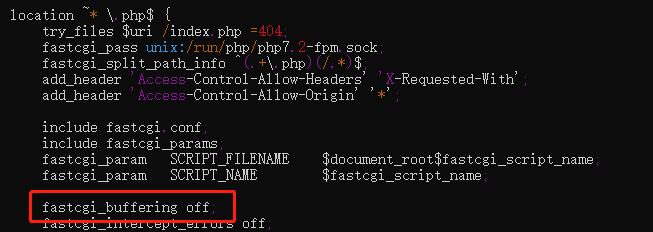
查看错误日志(应该是/var/log/nginx/error.log)如下: upstream timed out (110: Connection timed out) while reading upstream, client: 127.0.0.1, server: foo.com, request: “GET / HTTP/1.1”, upstream: “fastcgi://unix:/run/php/php7.2-fpm.sock:”, host: “foo.com” 具体方法: https://static.duan1v.top/images/lcgkAhE4DU7LypM.png 没错,只要在nginx配置中添加一句fastcgi_buffering off;

发现网站目录不是www-data的,也会很慢,不过是104,更新一下目录所属用户即可

查看已安装的wsl

1
wsl --list --verbose

关闭开启的wsl(根据上面命令获取的wsl的name)

1
wsl -t wsl-name

网站文件无法更新权限及所属用户(组)

1
2
sudo umount /mnt/d
sudo mount -t drvfs D: /mnt/d -o metadata

Mysql 初始化用户

 1
 2
 3
 4
 5
 6
 7
 8
 9
10
11
12
13
14
15
16
17
18
19
20
➜  ~ sudo cat /etc/mysql/debian.cnf
# Automatically generated for Debian scripts. DO NOT TOUCH!
[client]
host     = localhost
user     = debian-sys-maint
password = mdUacQRZSC9AfTNV
socket   = /var/run/mysqld/mysqld.sock
[mysql_upgrade]
host     = localhost
user     = debian-sys-maint
password = mdUacQRZSC9AfTNV
socket   = /var/run/mysqld/mysqld.sock


➜  ~ mysql -udebian-sys-maint -pmdUacQRZSC9AfTNV

# 创建新用户,并赋予权限
create user 'dywily'@'localhost' identified by 'q123456we';
grant all privileges on *.* to 'dywily'@'localhost';
flush privileges;

ubuntu编译安装指定php版本的扩展

需求

ubuntu已经安装php7.2,php7.0,php5.6,现在需要给php7.0编译安装swoole扩展

下载源文件,解压,并进入解压文件夹

1
2
3
wget https://github.com/swoole/swoole-src/archive/v2.2.0.tar.gz
tar -zxvf v2.2.0.tar.gz
cd swoole-src-2.2.0

编译安装

1
2
3
phpize7.0
./configure --with-php-config=/usr/bin/php-config7.0 #=号之后不要有空格
make clean && make && sudo make install

关于–with-php-config的路径,可以先

1
2
➜  ~ which php7.0
/usr/bin/php7.0

再使用如下命令,按Tab键

1
2
3
➜  ~ ll /usr/bin/php
php@            php7.0*         php7.2*         php-config@     php-config7.2*  phpize7.0*                                                                            
php5.6*         php7.1*         php7.3*         php-config7.0*  phpize@         phpize7.2*

得到路径:/usr/bin/php-config7.0

配置文件

1
vim /etc/php/7.0/mods-available/swoole.ini

extension=swoole.so

1
2
sudo ln -s /etc/php/7.0/mods-available/swoole.ini /etc/php/7.0/cli/conf.d/20-swoole.ini
sudo ln -s /etc/php/7.0/mods-available/swoole.ini /etc/php/7.0/fpm/conf.d/20-swoole.ini

重启php7.0-fpm

1
sudo service php7.0-fpm restart

查看

1
2
3
4
5
php7.0 -m|grep swoole
#查看完整php信息:
php7.0 -i|less  #按'q'退出,按'↓'查看
#查看扩展版本
php7.0 --ri swoole

切换php版本

1
2
3
4
5
sudo update-alternatives --set php /usr/bin/php8.1 # 切换

sudo update-alternatives --list php # 列出

sudo update-alternatives --install /usr/bin/python python /usr/bin/python3.6 1 # 将其他应用加到update-alternatives管理中,注意最后一个priority不能漏

编译安装php后,基础扩展安装

参考