一步两步是魔鬼的步伐

Duan1v's Blog

PHP 代码技巧

blade模版

json_encode数组后的字符串可以在模版中直接用作数组

  • helps.php 代码
 1
 2
 3
 4
 5
 6
 7
 8
 9
10
if (!function_exists('getPreviousMonth')) {
    function getPreviousMonth(): string
    {
        $currentDate = \Illuminate\Support\Carbon::now();
        $firstDayOfPreviousMonth = $currentDate->copy()->subMonth()->startOfMonth();
        $lastDayOfPreviousMonth = $currentDate->copy()->subMonth()->endOfMonth();

        return json_encode([$firstDayOfPreviousMonth->toDateString(), $lastDayOfPreviousMonth->toDateString()]);
    }
}
  • blade模版中可直接获取数组
1
{!! getPreviousMonth() !!}

新前端模版替换样式等资源的链接规则:

 1
 2
 3
 4
 5
 6
 7
 8
 9
10
11
href="((?!.*(?:https|http|html))[^{>"#]*)"
href="{{asset('theme/$1')}}"

src="((?!.*(?:https|http|html))[^{>"#]*)"
src="{{asset('theme/$1')}}"

52.073679870128096, 4.31522233905295

background
url\('?((?!.*(?:https|http|html))[^{>'"#]*)'?\)
url({{asset('UpConstruction-1.0.0/$1')}})

Carbon

时区

  • php内置函数获取所有时区
1
timezone_identifiers_list();
  • parse转换时区
 1
 2
 3
 4
 5
 6
 7
 8
 9
10
11
12
13
14
15
16
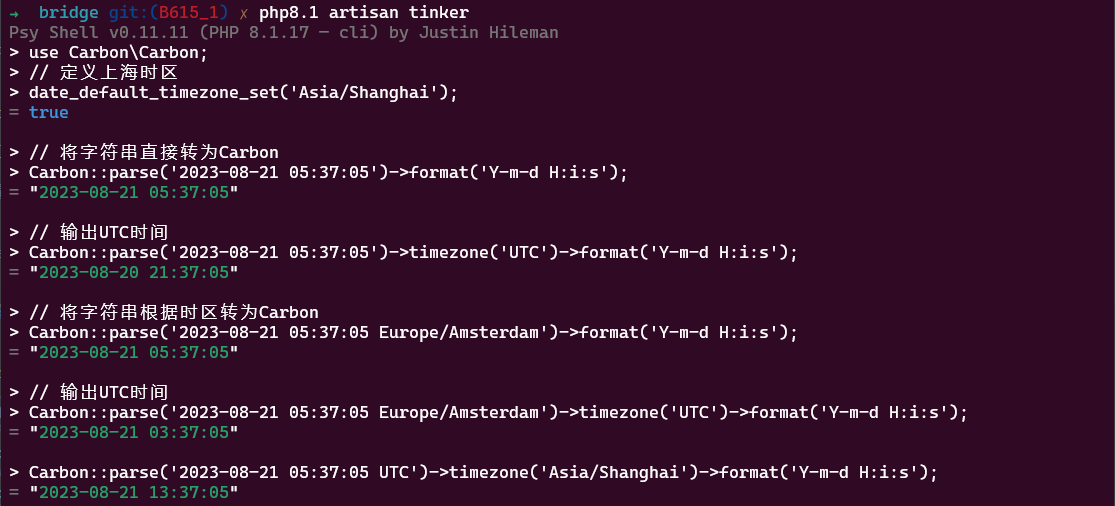
use Carbon\Carbon;
// 定义上海时区
date_default_timezone_set('Asia/Shanghai');
// 将字符串直接转为Carbon
Carbon::parse('2023-08-21 05:37:05')->format('Y-m-d H:i:s');
// 输出UTC时间
Carbon::parse('2023-08-21 05:37:05')->timezone('UTC')->format('Y-m-d H:i:s');
// 将字符串根据时区转为Carbon,等效于把一个Carbon转换,比如now()
Carbon::parse('2023-08-21 05:37:05 Europe/Amsterdam')->format('Y-m-d H:i:s');
// 输出UTC时间
Carbon::parse('2023-08-21 05:37:05 Europe/Amsterdam')->timezone('UTC')->format('Y-m-d H:i:s');
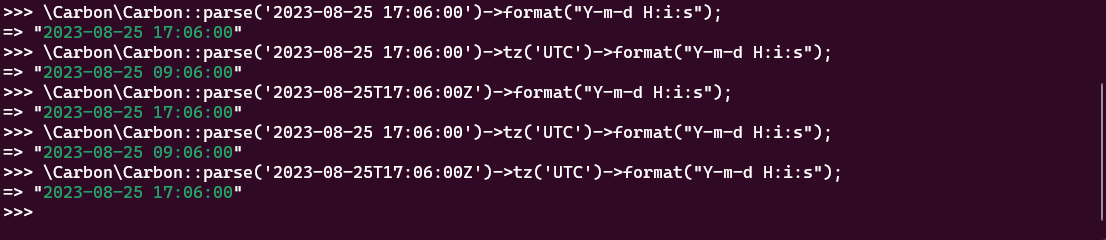
// 下方的时间字符串格式也可以获取UTC时间
Carbon::parse('2023-08-25T17:06:00Z')->format("Y-m-d H:i:s");
// 对比
Carbon::parse('2023-08-25T17:06:00Z')->tz('UTC')->format("Y-m-d H:i:s");
Carbon::parse('2023-08-25 17:06:00')->tz('UTC')->format("Y-m-d H:i:s");
https://static.duan1v.top/images/20230821153457.png https://static.duan1v.top/images/20230910003909.png
  • php保存时间到mysql
1
2
3
4
// 先根据系统的时区,或者前端传过来的时间+时区,转成UTC时区,再保存到mysql
Carbon::parse('2023-08-21 05:37:05')->timezone('UTC')->format('Y-m-d H:i:s');
// 等同于
Carbon::parse('2023-08-21 05:37:05')->utc()->format('Y-m-d H:i:s');
  • php从mysql读取时间
1
2
// 根据UTC时间转换字段,转成系统的时区,或者指定的其他时区
Carbon::parse('2023-08-21 05:37:05 UTC')->timezone('Asia/Shanghai')->format('Y-m-d H:i:s');
  • 关于mysql选用的字段,推荐datetime
Mysql的datetime和timestamp的区别
  • 范围:datetime 数据类型的范围是从 ‘1000-01-01 00:00:00’ 到 ‘9999-12-31 23:59:59’,而 timestamp 数据类型的范围是从 ‘1970-01-01 00:00:01’ UTC 到 ‘2038-01-19 03:14:07’ UTC。因此,datetime 支持更广泛的日期范围,而 timestamp 受限于 1970 年至 2038 年之间的范围。
  • 存储空间:datetime 数据类型占用固定的 8 字节存储空间,而 timestamp 数据类型占用 4 字节存储空间。
  • 自动更新功能:当插入或更新记录时,datetime 列不会自动更新,它将保留插入或更新时的值。而 timestamp 列具有自动更新功能,当插入或更新记录时,会自动更新为当前时间戳。
  • 时区处理:datetime 列不会自动转换时区,它存储的是直接输入的日期和时间值。而 timestamp 列会自动将日期和时间值从当前会话时区转换为 UTC 进行存储,并在检索时再将其转换回会话时区。
  • 获取格式化时区
1
$timezone = 'GMT' . now()->format("P");
  • 获取 2023-08-21T05:37:05+00:00 格式的时间
1
Carbon::parse('2023-08-21 05:37:05 UTC')->toW3cString();

时间差

  • 主要是注意第二个参数
1
2
3
4
5
use Carbon\Carbon;
//为正负数
Carbon::parse('2023-08-21')->diffInDays('2023-08-11', false); 
//为正负数的绝对值
Carbon::parse('2023-08-21')->diffInDays('2023-08-11', true);

注意

  • 由于时令的存在,会导致进入时令的那天的时间不是24小时,即两天的时间戳(strtotime()函数获取)之差/3600不是24

自定义的Debugbar

自定义logger

 1
 2
 3
 4
 5
 6
 7
 8
 9
10
11
12
13
14
15
16
17
18
19
20
21
22
23
24
25
26
27
28
29
30
31
32
33
34
35
36
37
38
39
40
<?php

namespace App\Providers;

use Illuminate\Support\ServiceProvider;
use Monolog\Formatter\LineFormatter;
use Monolog\Handler\RotatingFileHandler;
use Monolog\Logger;

class AppServiceProvider extends ServiceProvider
{
    /**
     * Bootstrap any application services.
     *
     * @return void
     */
    public function boot()
    {
    }

    /**
     * Register any application services.
     *
     * @return void
     */
    public function register()
    {
        $this->app->bind('customer_logger', function ($app) {
            $logger = new Logger('custom');
            $handler=new RotatingFileHandler(storage_path('logs/custom.log'),5, Logger::INFO);
            $formatter = new LineFormatter(
                '[%datetime%] %channel%.%level_name%: %message% %context% %extra%' . PHP_EOL,
                'Y-m-d H:i:s.u'
            );
            $handler->setFormatter($formatter);
            $logger->pushHandler($handler);
            return $logger;
        });
    }
}

新建Middleware

 1
 2
 3
 4
 5
 6
 7
 8
 9
10
11
12
13
14
15
16
17
18
19
20
21
22
23
24
25
26
27
28
29
30
31
32
33
34
35
36
37
38
39
40
41
42
43
44
45
46
47
48
49
50
51
52
53
54
55
56
57
58
59
60
61
62
63
64
65
66
67
68
69
<?php

namespace App\Http\Middleware;

use Carbon\Carbon;
use Illuminate\Support\Facades\DB;
use Monolog\Formatter\LineFormatter;
use Monolog\Handler\RotatingFileHandler;
use Monolog\Handler\StreamHandler;
use Monolog\Logger;

/**
 * Class QueryDebugMiddleware
 * @package App\Http\Middleware
 *
 */
class QueryDebugMiddleware
{
    public function handle($request, \Closure $next)
    {
        $logger = app('customer_logger');
        DB::listen(function ($query) use ($logger) {
            $caller = $this->getCallerInfo();
            $file = $caller['file'];
            $line = $caller['line'];

            // 在这里进行自定义的记录逻辑,例如使用日志记录
            $logger->info('SQL Query', [
                'fullSql' => vsprintf(str_replace('?', "'%s'", $query->sql), $query->bindings),
                'time'    => $query->time,
                'file'    => $file,
                'line'    => $line,
            ]);
        });

        return $next($request);
    }

    protected function getCallerInfo()
    {
        $queryFiles = [
            'Illuminate/Database/',
        ];
        $traces = collect(debug_backtrace())->pluck('line', 'file');
        $start = false;
        $end = true;
        foreach ($traces as $file => $line) {
            if (!$start) {
                $start = collect($queryFiles)->contains(function ($value) use ($file) {
                    return strpos($file, $value) !== false;
                });
            } else {
                $end = collect($queryFiles)->contains(function ($value) use ($file) {
                    return strpos($file, $value) !== false;
                });
            }
            if (!$end && $file && $line) {
                return [
                    'file' => $file,
                    'line' => $line,
                ];
            }
        }
        return [
            'file' => 'Unknown',
            'line' => 'Unknown',
        ];
    }
}

在线上需要观察的方法中添加

1
2
3
4
    public function __construct()
    {
        $this->middleware(QueryDebugMiddleware::class)->only('functionName');
    }

文件

文件上传限制

 1
 2
 3
 4
 5
 6
 7
 8
 9
10
11
12
13
14
15
16
17
18
19
20
21
22
23
24
25
26
27
28
29
30
31
32
33
34
代码里设置这个
ini_set('memory_limit',-1);
ini_set("max_execution_time", "500");
set_time_limit(500);

php配置里
file_uploads = On

; Temporary directory for HTTP uploaded files (will use system default if not
; specified).
; https://php.net/upload-tmp-dir
;upload_tmp_dir =

; Maximum allowed size for uploaded files.
; https://php.net/upload-max-filesize
upload_max_filesize = 50M

; Maximum number of files that can be uploaded via a single request
max_file_uploads = 20

post_max_size = 50M

nginx里设置这个
proxy_connect_timeout  500s;
proxy_send_timeout  500s;
proxy_read_timeout  500s;
fastcgi_connect_timeout 500s;
fastcgi_send_timeout 500s;
fastcgi_read_timeout 500s;


# client_max_body_size 用来修改允许客户端上传文件的大小。默认为1m,如果设置为0,表示上传文件大小不受限制。
# 可以在以下模块设置: http, server, location
client_max_body_size 10m;

迁移文件

对于laravel较旧的版本(5之前吧),无法直接指定迁移文件,但老的迁移文件又有问题,无法维护,可以新建文件夹,指定新建的文件夹进行迁移

1
php artisan migrate --path=database/migrations/new

查看sql

获取最后一次sql

1
2
3
4
5
6
$bindings = $query->getBindings();

// 替换占位符为实际的值
$fullSql = str_replace('?', '"%s"', $query->toSql());
$fullSql = vsprintf($fullSql, $bindings);
dd($fullSql);

获取代码段执行的sql (tinker 中可执行)

1
2
3
4
5
6
7
8
9
> $qdm=new \App\Http\Middleware\QueryDebugMiddleware();
= App\Http\Middleware\QueryDebugMiddleware {#6075}

> $qdm->handle(request(), fn()=>1);
= 1

> \App\Http\Models\InboundScanModel::with('packages')->where('id',111859)->get();

# sudo tail -f storage/logs/custom-2025-09-04.log

composer 安装新扩展

原始composer.json不要使用任何模糊版本,均指名指定版本

安装新扩展时,不更新其他扩展版本的方式 (改成自己的包名,–with-dependencies –ignore-platform-reqs 参数可以先不使用,无法安装再使用)

1
2
3
composer require php-mime-mail-parser/php-mime-mail-parser:7.1.0 --no-update

composer update php-mime-mail-parser/php-mime-mail-parser --with-dependencies --ignore-platform-reqs

Ubuntu监控目录

注意

  • 业务是监控目录,生成nginx配置

  • 主机需要安装 inotify-tools ,nginx

1
sudo apt-get install inotify-tools nginx -y
  • 将docker项目保存nginx配置的目录挂载到主机,主机目录需要777权限

相关文件,根目录为 root

  • build-web.sh
1
2
3
4
5
6
7
8
9
#!/bin/bash

dir=$1

dir2=$2

sleep 1
cp "$dir/$dir2/default.conf" "/etc/nginx/sites-enabled/$dir2-my-laravel-project.com"
service nginx restart
  • web-dir-monitor.sh
 1
 2
 3
 4
 5
 6
 7
 8
 9
10
11
12
#!/bin/sh

# 监视的文件或目录
filename=$1

# 监视发现有增、删、改时执行的脚本
script=$2

inotifywait -mq --format '%f' -e create  $filename | while read line
  do
      bash $script $filename $line
  done
  • 其他事件监听示例
 1
 2
 3
 4
 5
 6
 7
 8
 9
10
11
12
13
14
15
# 包含CLOSE_WRITE字样的事件,表示文件写入已完成,比如ftp上传文件后,完成上传操作,再进行其他操作,可以用到
inotifywait -m /home/vsftpd/dywily/ -e create -e close_write |
while read path action file; do
    if [[ "$action" == "CREATE" ]]; then
        echo "File '$file' was created."
    elif [[ "$action" == *"CLOSE_WRITE"* ]]; then
        echo "File '$file' has been written and closed."
    fi
done

# 所有事件
inotifywait -m /home/vsftpd/dywily/ -e access -e modify -e attrib -e close_write -e close_nowrite -e open -e moved_from -e moved_to -e create -e delete -e delete_self -e move_self |
while read path action file; do
    echo "Event: $action on file: $file in directory: $path"
done
  • nginx配置示例
 1
 2
 3
 4
 5
 6
 7
 8
 9
10
server {
  listen 10001;
  # server_name  ~^(?<subdomain>.+)\.test_domain\.com$;
  # root   "/$subdomain";
  root   "/home/laravel-project/storage/app/websites/1";
  index index.html index.htm;
  location / {
    try_files $uri $uri/ =404;
  }
}
  • 执行命令
1
bash web-dir-monitor.sh /home/laravel-project/storage/app/websites build-web.sh
  • 当然也可以和supervisor一起食用

PHP 错误解决经验

查看日志

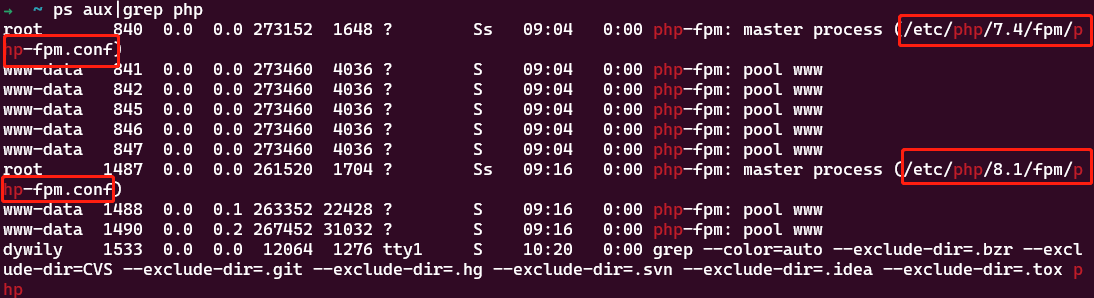
查看可疑的僵尸进程

1
ps aux|grep php

laravel中

打印sql

1
2
$fullSql = vsprintf(str_replace('?', '%s', $query->toSql()), $query->getBindings());
dd($fullSql);

输出日志到指定文件

 1
 2
 3
 4
 5
 6
 7
 8
 9
10
11
12
13
14
15
16
17
\Illuminate\Support\Facades\DB::enableQueryLog();

# 代码块

$queries = \Illuminate\Support\Facades\DB::getQueryLog();
foreach ($queries as $query) {
    $sql = $query['query'];
    $bindings = $query['bindings'];

    // 将 SQL 查询参数拼接为完整的 SQL 查询语句
    $fullSql = vsprintf(str_replace('?', "'%s'", $sql), $bindings);
    // 将完整的 SQL 查询语句写入日志文件
    $logger = new Logger('custom');
    $logger->pushHandler(new StreamHandler(storage_path('logs/custom.log'), Logger::INFO));

    $logger->info($fullSql);
}

重启队列,清除缓存

1
2
3
4
5
6
7
8
9
# php artisan schedule:finish {id}
php artisan config:clear
php artisan view:clear
php artisan cache:clear
composer dump-autoload
# laravel9中才有
# php artisan schedule:clear-cache

php artisan queue:restart

查看队列积存

  • 古老版queue:work常驻内存的方法:forever,现在一般都是supervisor
1
forever start -c php artisan queue:work --tries=1 --queue=default,high
  • 查看队列积存,先进入redis-cli;默认队列,可以在 config/queue.php 中查看
1
2
3
4
# default队列的长度
llen queues:default
# default队列前10条job
lrange queues:default 0 10
  • 清空redis中的指定job的剩余队列:
1
redis-cli LRANGE "queues:QueueName" 0 -1 | grep "JobName" | while IFS= read -r line; do printf "%q" "$line" | xargs -I {} redis-cli LREM "queues:QueueName" 0 '{}'; done

手动执行定时脚本中的命令

1
php artisan 命令签名

重启php,nginx,cron,supervisor等服务

关于supervisor服务,参考Supervisor的使用

关于cron,查看定时脚本的用户

1
2
3
4
5
sudo crontab -l -u 用户名

sudo service cron restart

* * * * * php7.4 /mnt/g/Workplace/explore/php/blog/artisan schedule:run >> /dev/null 2>&1

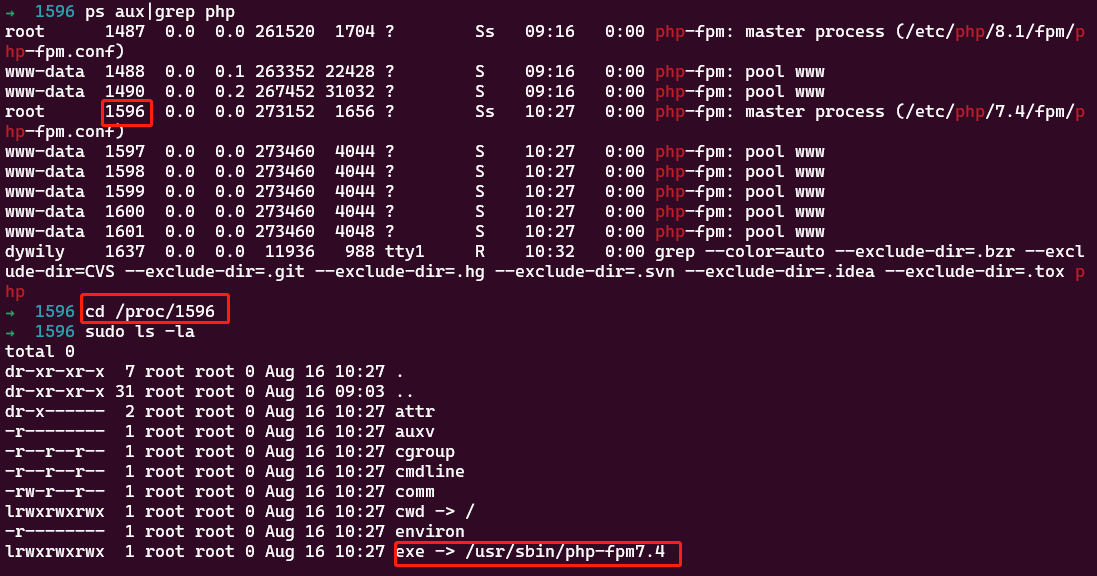
关于重启fpm进程

  • 现在fpm主进程中找到保存pid的文件
https://static.duan1v.top/images/20230816102552.png
  • 然后使用SIGUSR2重启
1
2
3
4
kill -SIGUSR2 `cat /www/server/php/72/var/run/php-fpm.pid`

# 也可以启动时指定pid的文件
sudo /usr/sbin/php-fpm7.4 -c /etc/php/7.4/fpm/php-fpm.conf -y /run/php/php7.4-fpm.pid

关于重新加载nginx配置

1
/usr/bin/nginx -s reload

查看进程相关信息

https://static.duan1v.top/images/20230816103313.png

查看端口相关信息

1
2
3
netstat -tunlp | grep 端口号
# or
lsof -i:端口号

502 bad gateway

  • 本地wsl有时候会莫名其妙报这个
  • 先重启nginx,再重启php-fpm

清理服务器磁盘

1
sudo du -sh /home/ubuntu/* | sort -rn | head

Ubuntu常用命令

将文件A的内容写入到文件B中

  • cat A > B (追加的话, > 改成 >>)

  • sed -n ‘w B’ A

  • 效率对比

1
2
3
start=$(date +%s%N) && cat /tmp/784-35445384-1692024995-complete.json >> test.log && end=$(date +%s%N) && echo $((($end - $start) / 1000000))

start=$(date +%s%N) && sed -n 'w test.log' /tmp/784-35445384-1692024995-complete.json && end=$(date +%s%N) && echo $((($end - $start) / 1000000))
https://static.duan1v.top/images/20230816115547.png

查找内容

pattern和regex

Pattern
  • pattern指基本正则表达式(Basic Regular Expression,BRE)
  • pattern 是一种简化的正则表达式语法,通常用于基本的模式匹配。
  • pattern 可以包含普通字符、通配符和一些特殊字符,如 .、*、? 等。
  • pattern 不支持高级的正则表达式特性,如分组 ( )、选择符 |、定位符 ^ 和 $ 等。
Regex
  • regex 指扩展正则表达式(Extended Regular Expression,ERE)
  • regex 是正则表达式的完整语法,支持更广泛的模式匹配和高级特性。
  • regex 可以使用普通字符、元字符、量词、字符类、分组、引用等来定义复杂的模式。
  • regex 支持在模式中使用特殊字符和元字符进行更精确的匹配和操作。

vim test

1
2
3
4
5
6
7
8
John Doe 25 8900
Jane Smith 30 6200
David Johnson 23 3500
Mia Nguyen 56 4200
Mohammed Ali 45 5800
Olivia Kim 40 2300
Olivia Ali 34 550
David Kim 36 6000

grep

  • 示例
1
2
grep -i -n "d" test
grep -i -n -E "6$" test
https://static.duan1v.top/images/20230821093233.png
Tips
  • 使用 -E 选项可以启用regex,否则只支持pattern;
  • 使用 -n 选项可以在输出结果中显示匹配行的行号;
  • 使用 -i 选项可以忽略搜索时的大小写区分;
  • 使用 -r 选项可以递归搜索指定目录及其子目录中的文件。

awk

  • 示例
 1
 2
 3
 4
 5
 6
 7
 8
 9
10
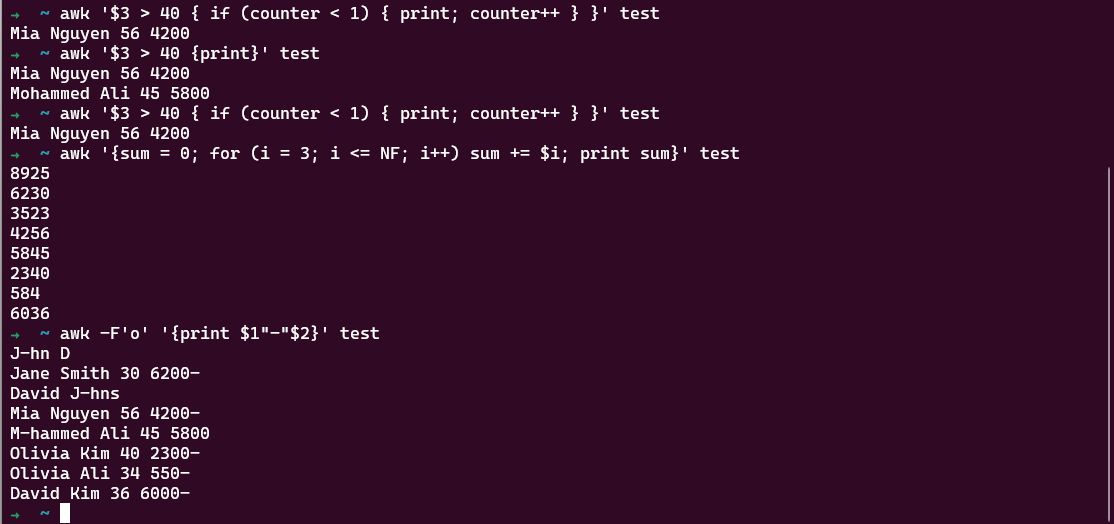
awk '{print}' test
awk '{print $2}' test
awk '{sum += $3} END {print sum}' test
awk '$3 > 40 {print}' test
awk '$3 > 40 { if (counter < 1) { print; counter++ } }' test # 只取满足条件的第一行
awk -F'o' '{print $1"-"$2}' test
awk '{if ($3 > 30) print "Large"; else print "Small"}' test
awk '{sum = 0; for (i = 3; i <= NF; i++) sum += $i; print sum}' test
awk '/^O/ {print}' test
awk '{gsub(/O|o/, "H"); print}' test # 将O或o,替换为H
https://static.duan1v.top/images/20230821100530.png
参考

新增SFTP用户

示例

  • 添加用户
1
2
3
4
sudo addgroup sftp_test_group
sudo useradd -g sftp_test_group -m sftp_test_user1
# 键入密码,生成密码:https://www.sexauth.com/
sudo passwd sftp_test_user1
https://static.duan1v.top/images/20230821111222.png
  • 可能用到的根据用户查询组内其他用户
1
2
3
groups sftp_test_user1
getent group sftp_test_group
awk -F":" '{print $1"|"$4}' /etc/passwd | grep -n -E "\|1003$"
https://static.duan1v.top/images/20230821111438.png
 1
 2
 3
 4
 5
 6
 7
 8
 9
10
11
sudo vim /etc/ssh/sshd_config
# 追加以下选项
AllowUsers sftp_test_user1
Match User sftp_test_user1
ChrootDirectory /var/sftp/sftp_test_user1
ForceCommand internal-sftp

sudo mkdir /var/sftp/sftp_test_user1
sudo chown -R sftp_test_user1:sftp_test_group /var/sftp/sftp_test_user1

sudo service ssh restart

Load data导入csv文件

场景

  • 数据量较大且需要较高的导入效率
  • mysqlimport本质就是对load data语句的封装
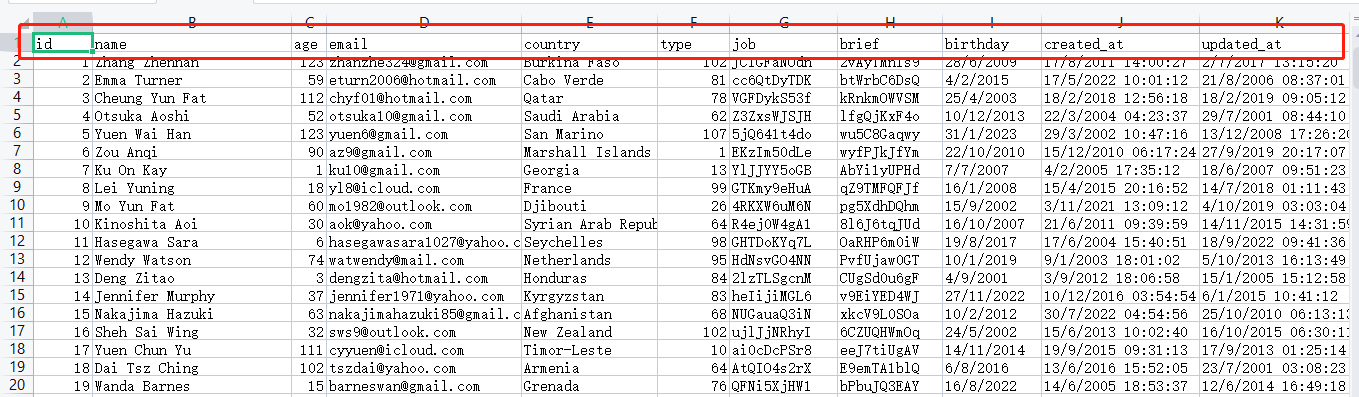
  • 本次使用的csv文件是50m,36w行,12列

具体实践

  • 创建数据表
 1
 2
 3
 4
 5
 6
 7
 8
 9
10
11
12
13
CREATE TABLE `my_user` (
  `id` int unsigned NOT NULL AUTO_INCREMENT,
  `name` varchar(255) CHARACTER SET utf8mb4 COLLATE utf8mb4_general_ci NOT NULL DEFAULT '',
  `age` tinyint NOT NULL DEFAULT '0',
  `email` varchar(255) CHARACTER SET utf8mb4 COLLATE utf8mb4_general_ci NOT NULL DEFAULT '',
  `country` varchar(255) COLLATE utf8mb4_general_ci NOT NULL DEFAULT '',
  `type` tinyint NOT NULL DEFAULT '0',
  `job` varchar(255) COLLATE utf8mb4_general_ci NOT NULL DEFAULT '',
  `brief` varchar(255) COLLATE utf8mb4_general_ci NOT NULL DEFAULT '',
  `created_at` datetime NOT NULL DEFAULT CURRENT_TIMESTAMP,
  `updated_at` datetime NOT NULL DEFAULT CURRENT_TIMESTAMP ON UPDATE CURRENT_TIMESTAMP,
  PRIMARY KEY (`id`)
) ENGINE=InnoDB DEFAULT CHARSET=utf8mb4 COLLATE=utf8mb4_general_ci;
  • 准备csv文件,可以使用Navicat自动填充数据,再导出成csv,我的csv名为 my_user.csv

  • csv文件中的列排序(注意比数据表中多了一列birthday)

https://static.duan1v.top/images/20230807201234.png
  • mysql的配置 /etc/mysql/mysql.conf.d/mysqld.cnf[mysqld] 选项添加配置,重启mysql
1
 secure-file-priv=/tmp
  • csv文件需要放在上面的目录(/tmp)下

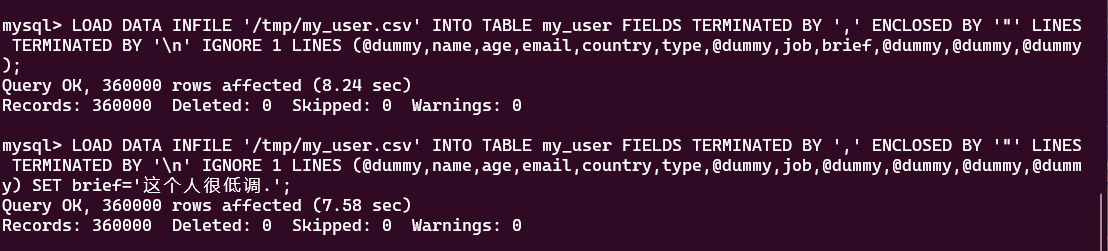
  • sql语句

1
LOAD DATA INFILE '/tmp/my_user.csv' INTO TABLE my_user FIELDS TERMINATED BY ',' ENCLOSED BY '"' LINES TERMINATED BY '\n' IGNORE 1 LINES (@dummy,name,age,email,country,type,@dummy,job,@dummy,@dummy,@dummy,@dummy) SET brief='这个人很低调.';
  • 括号中的列需要和csv中的列一致(顺序和数量)
  • 将数据表中需要导入的列对应写在括号内,不需要导入的数据表的列,用 @dummy 占位
  • 使用SET 指定列(brief)的值
https://static.duan1v.top/images/20230807205432.png

关于将大号Excel转为CSV

  • 使用的是 libreoffice
1
libreoffice --version
  • 使用的命令是
1
cd /tmp && soffice --headless --convert-to csv:"Text - txt - csv (StarCalc)":"44,34,0,1,1/1" my_user.xlsx --outdir ./
  • 可能报错 javaldx failed! ,这主要就是,在正式环境中,没有设置执行用户的home文件夹.记得重启容器!! 假设执行用户为 nobody
 1
 2
 3
 4
 5
 6
 7
 8
 9
10
# 创建一个目录,例如 /home/nobody
mkdir -p /home/nobody/.config/libreoffice

# 更改目录的所有者和权限
chown -R nobody:nogroup /home/nobody
chmod -R 755 /home/nobody

apk --no-cache add shadow sudo
# error: javaldx failed! 主要就是没有设置执行用户的home文件夹.记得重启容器!!
usermod -d /home/nobody nobody
  • 如果执行转换命令不输出任何东西,可能是/tmp文件夹权限问题
1
sudo chmod 777 /tmp
  • python的Modin+Dask待研究

google api 授权及使用 总结

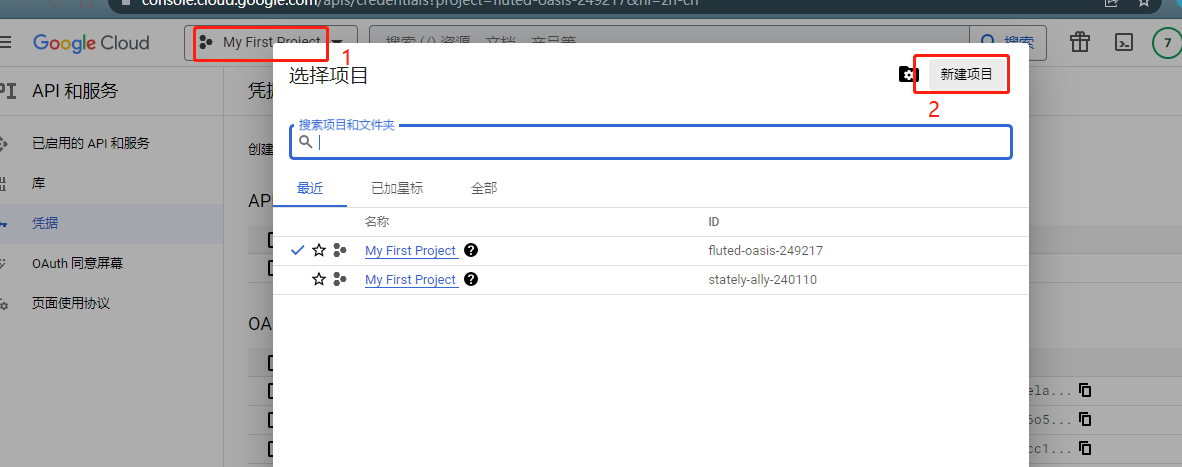
控制台中的操作

创建项目

https://static.duan1v.top/images/20230216223857.png

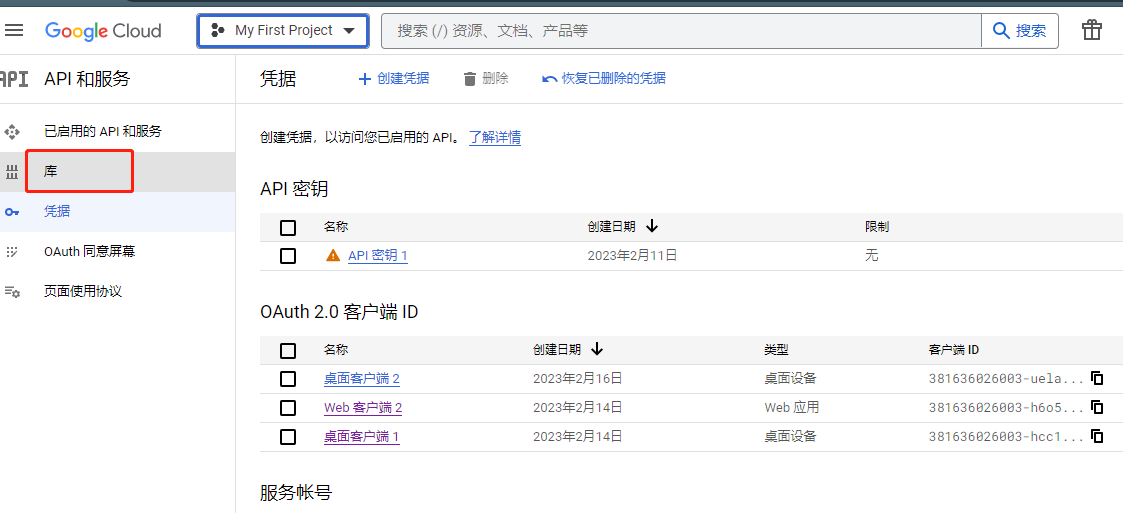
在库中选择需要的api,并启用

https://static.duan1v.top/images/20230216224808.png

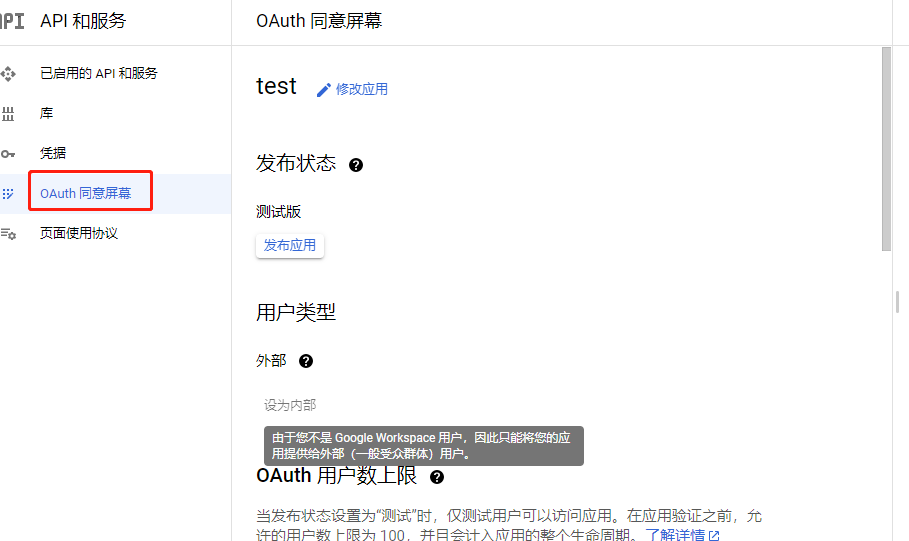
Oauth 同意屏幕配置授权应用基础信息及可调用接口范围

  • 个人账号只能配置为外部用户,需要配置测试用户及发布为正式应用;google suit的用户可以配置为内部用户
  • 第一页配置些应用的基本信息
  • 第二页配置的是授权后,应用内可以调用的接口
  • 个人账号只能配置为外部用户,需要配置测试用户,可以是自己的账号
https://static.duan1v.top/images/20230216225207.png

配置凭据

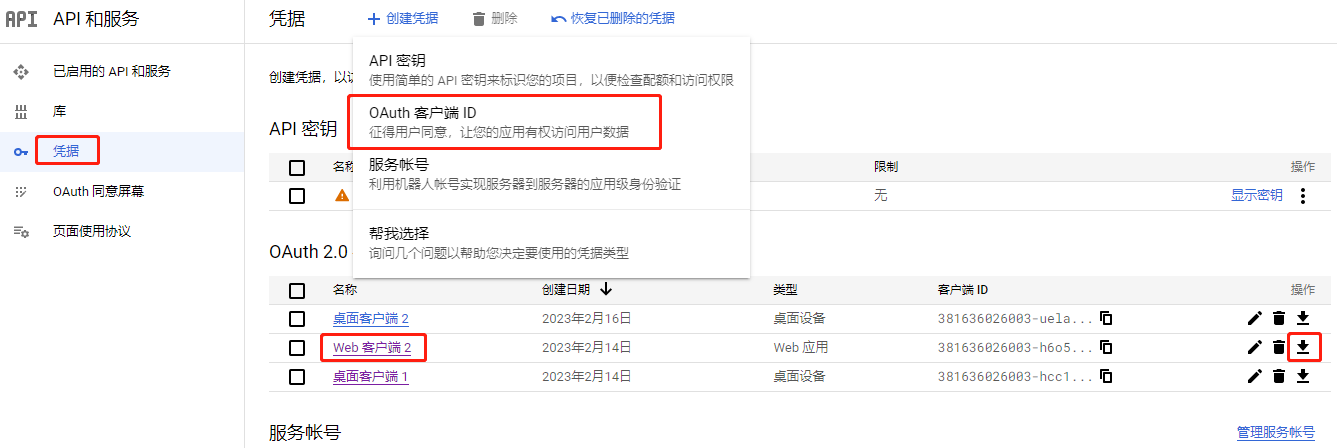
OAuth客户端授权

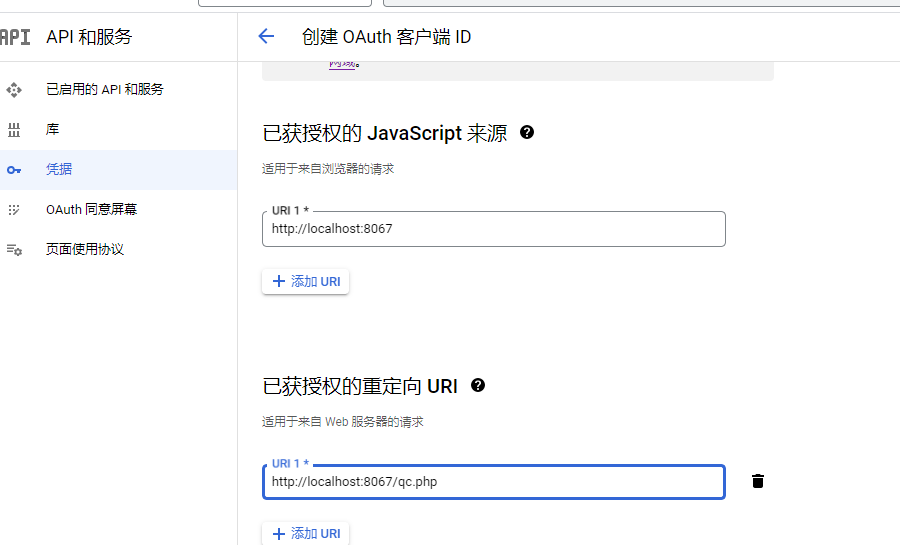
  • 需要通过下载的凭据生成授权跳转链接,获取code,生成token.json

  • 新建web应用类型的凭据,并配置授权完成后的跳转地址,可以写需要的授权那个页面地址,本地可以配置为localhost

  • 下载凭证

https://static.duan1v.top/images/20230216230330.png https://static.duan1v.top/images/20230217000810.png

服务端授权

  • 本意是通过公私钥匹配,使应用中可以在服务端直接调用接口,无需进行授权交互

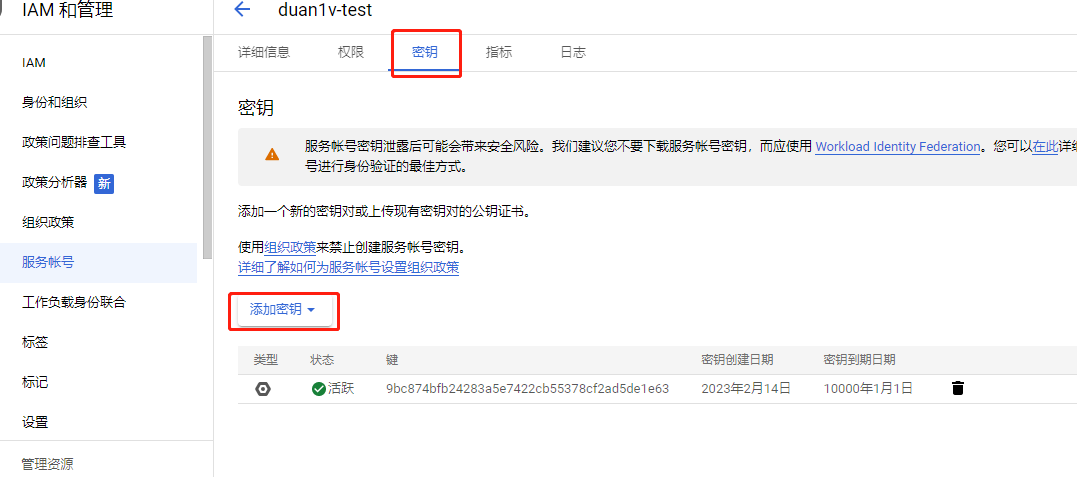
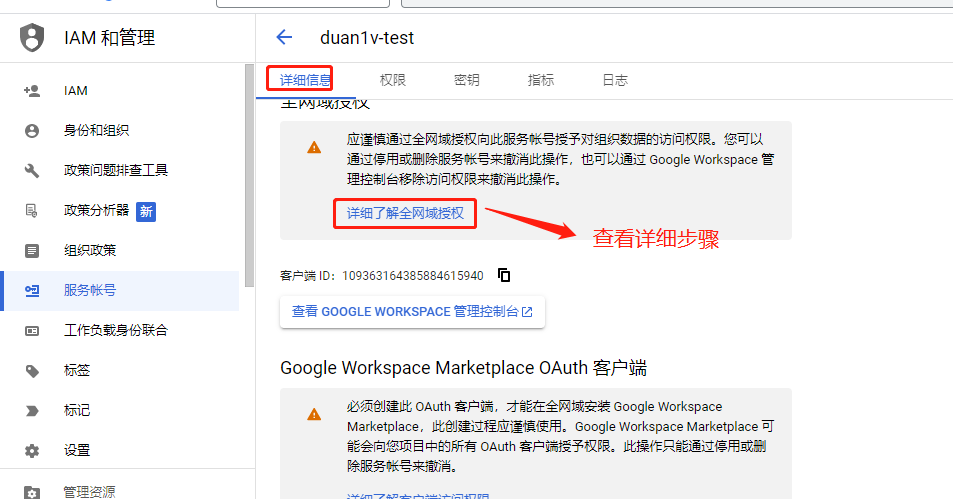
  • 创建完成后要继续编辑,添加密钥,及配置全网域(个人账号无法配置)

https://static.duan1v.top/images/20230216231734.png https://static.duan1v.top/images/20230216233017.png

测试用例

引入google api包

1
composer require google/apiclient:^2.12.1

使用凭据

客户端授权

 1
 2
 3
 4
 5
 6
 7
 8
 9
10
11
12
13
14
15
16
17
18
19
20
21
22
23
24
25
26
27
28
29
30
31
32
33
34
35
36
37
38
39
40
41
42
43
44
45
46
47
48
49
50
51
52
53
54
55
56
57
58
59
60
61
62
63
64
65
66
<?php

require __DIR__ . '/vendor/autoload.php';

use Google\Client;
use Google\Service\Gmail;

function getLabels()
{
    $client = new Client();
    $client->setApplicationName('Gmail API PHP Quickstart');
    $client->setScopes('https://www.googleapis.com/auth/gmail.readonly');
    $client->setAuthConfig("client_secret.json");
    $client->setAccessType('offline');
    $client->setPrompt('select_account consent');
    $tokenPath = "token.json";
    if (file_exists($tokenPath)) {
        $accessToken = json_decode(file_get_contents($tokenPath), true);
        $client->setAccessToken($accessToken);
    } else if ($authCode = $_GET["code"]) {
        // Exchange authorization code for an access token.
        $accessToken = $client->fetchAccessTokenWithAuthCode($authCode);
        $client->setAccessToken($accessToken);

        // Check to see if there was an error.
        if (array_key_exists('error', $accessToken)) {
            throw new \Exception(join(', ', $accessToken));
        }
        // Save the token to a file.
        if (!file_exists(dirname($tokenPath))) {
            mkdir(dirname($tokenPath), 0700, true);
        }
        file_put_contents($tokenPath, json_encode($client->getAccessToken()));
    }

    // If there is no previous token or it's expired.
    if ($client->isAccessTokenExpired()) {
        // Refresh the token if possible, else fetch a new one.
        if ($client->getRefreshToken()) {
            $client->fetchAccessTokenWithRefreshToken($client->getRefreshToken());
        } else {
            // Request authorization from the user.
            $authUrl = $client->createAuthUrl();
            header("Location: " . $authUrl);
        }
    }
    try {
        $service = new Gmail($client);
        // Print the labels in the user's account.
        $user = 'me';
        $results = $service->users_labels->listUsersLabels($user);

        if (count($results->getLabels()) == 0) {
            print "No labels found.\n";
        } else {
            print "Labels:\n";
            foreach ($results->getLabels() as $label) {
                printf("- %s\n", $label->getName());
            }
        }
    } catch (\Exception $e) {
        echo "Message: " . $e->getMessage();
    }
}

getLabels();
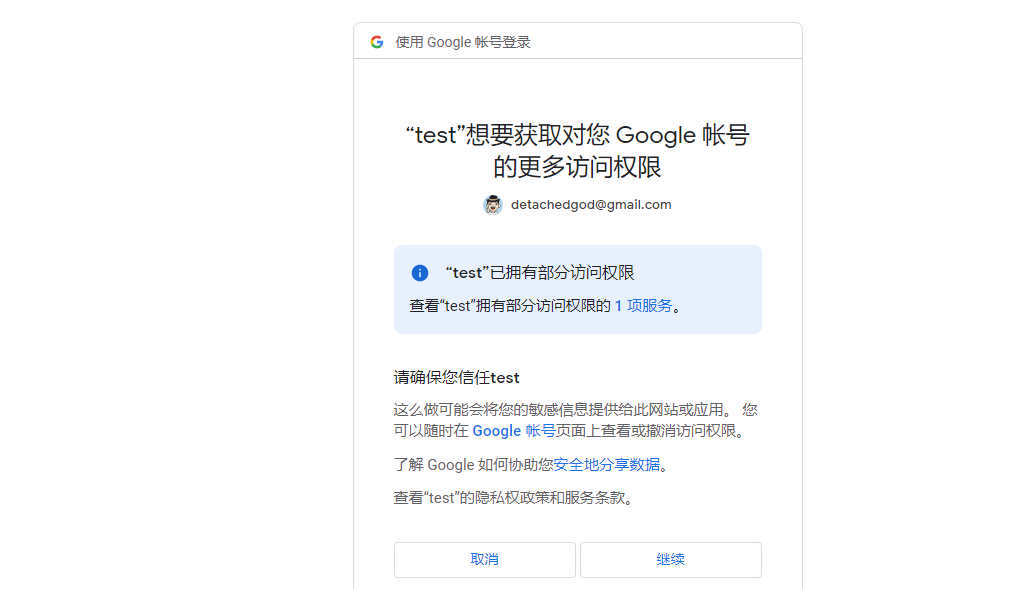
  • 页面授权
https://static.duan1v.top/images/20230217001106.png https://static.duan1v.top/images/20230217001518.png

服务端授权

1
2
3
$gmailService = new Google_Service_Gmail($client);

$labels = $gmailService->users_labels->listUsersLabels("me");
 1
 2
 3
 4
 5
 6
 7
 8
 9
10
11
12
13
14
PHP Fatal error:  Uncaught Google\Service\Exception: {
  "error": {
    "code": 400,
    "message": "Precondition check failed.",
    "errors": [
      {
        "message": "Precondition check failed.",
        "domain": "global",
        "reason": "failedPrecondition"
      }
    ],
    "status": "FAILED_PRECONDITION"
  }
}

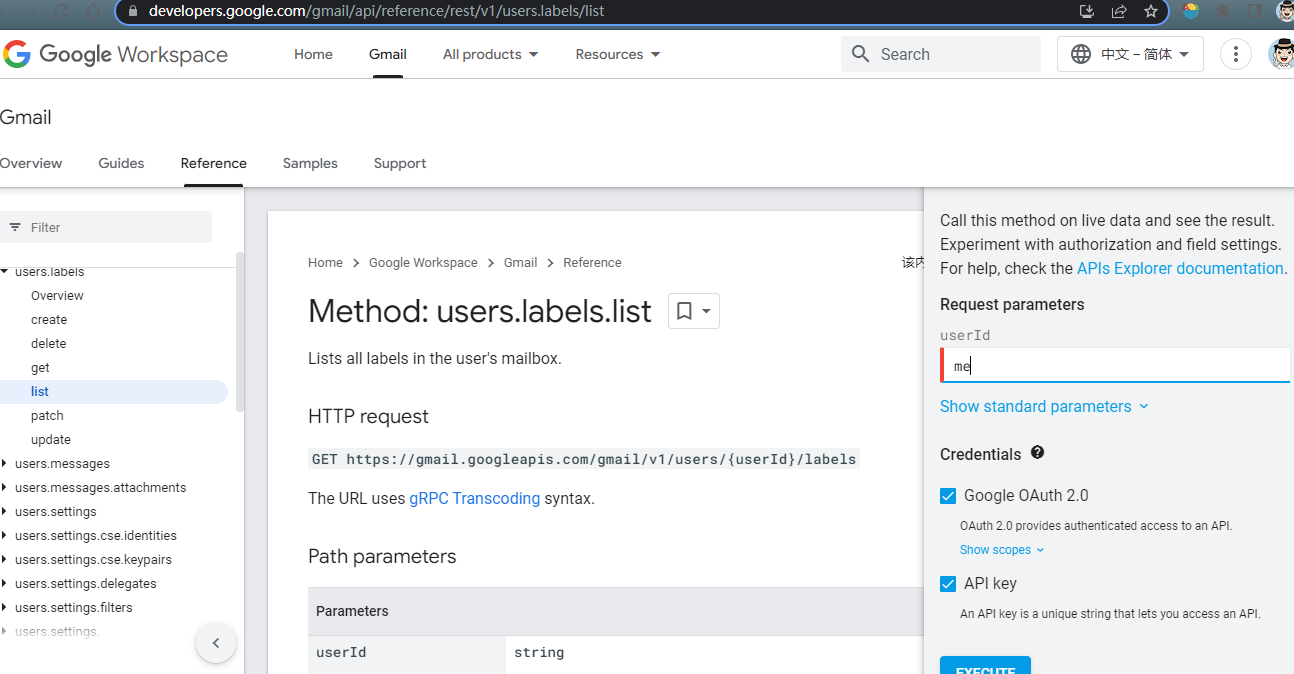
调试接口

https://static.duan1v.top/images/20230217005004.png